Timeline:
12 Weeks
Client:
Park Chicago (speculative)
Role:
UI Designer, UX Researcher
Team:
(5) Ally Ohr. Camille Forster, Janiya Garner, Barrett Light, Van Ma
Project Overview
Parking in Chicago can be stressful, costly, and confusing, exacerbating already negative perceptions of city privatized parking. We saw opportunities in the Park Chicago app to alleviate stress that comes from this experience. How can we better support users' financial needs and use design to signify a move towards a more equitable future for parking?
Our Focus
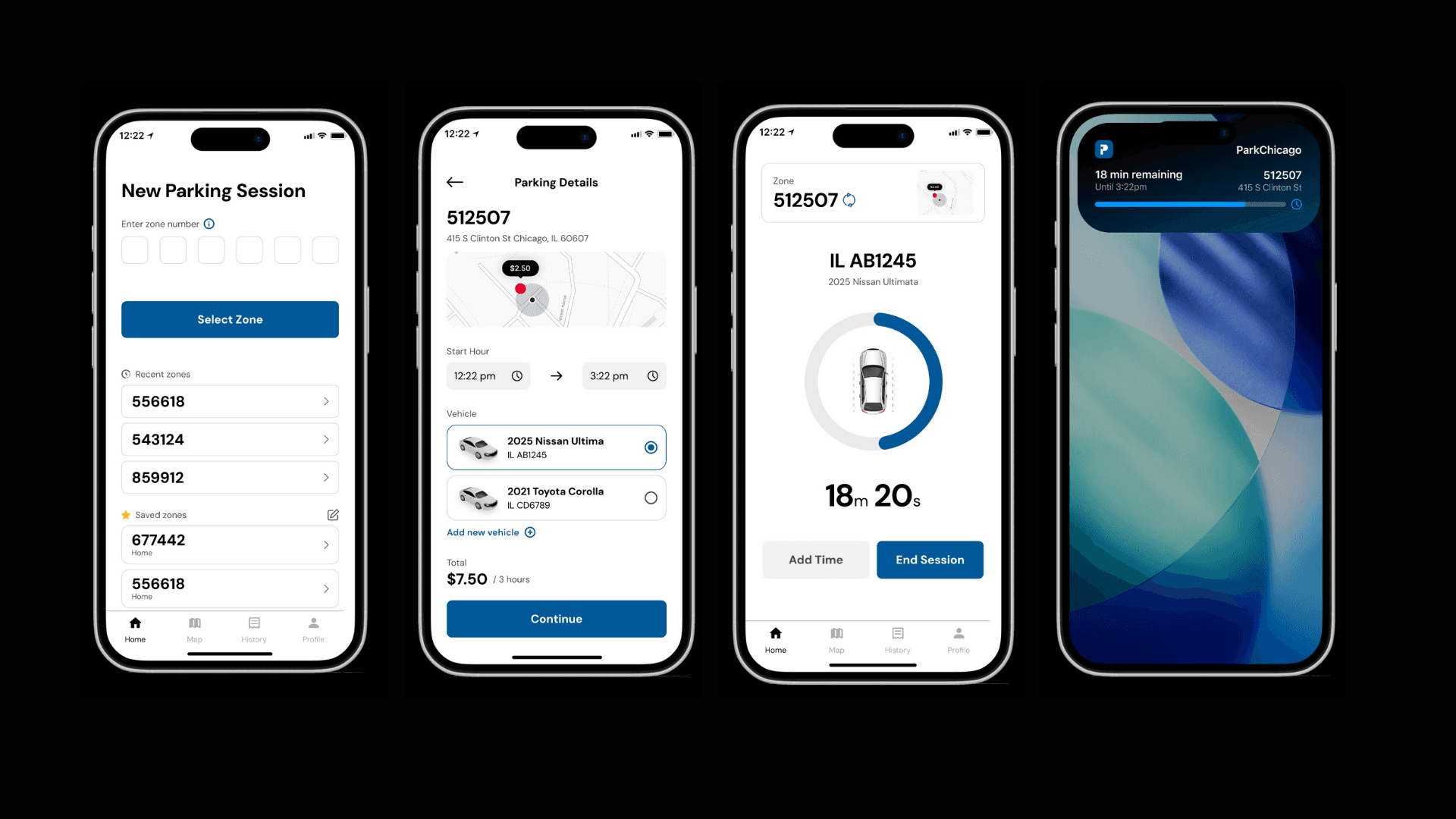
Our redesign focused on creating more flexible payment options, improving user confidence in the parking process through adding a parking map, and revitalizing the user interface.
Research
Research
We interviewed 11 users of the Park Chicago app with the goal of:
Understanding what frustrates users while parking (not limited to just with the app)
Learning how the Park Chicago app helps relieve pain points or contributes to them.
Insights:
INSIGHT #1: Users wanted more payment method options and disliked being forced to reload their account by $20 each time it ran out.
INSIGHT #2: App interface is outdated and cluttered, lacks visual hierarchy.
INSIGHT #3: Users found it difficult to find available spaces, often circling the block to find one
INSIGHT #4: Users mentioned confusion and mixed confidence when first joining the app and using it to pay for parking, particularly with correct zone selection and rules.18-24 years old
We interviewed 11 users of the Park Chicago app with the goal of:
Understanding what frustrates users while parking (not limited to just with the app)
Learning how the Park Chicago app helps relieve pain points or contributes to them.
Insights:
INSIGHT #1: Users wanted more payment method options and disliked being forced to reload their account by $20 each time it ran out.
INSIGHT #2: App interface is outdated and cluttered, lacks visual hierarchy.
INSIGHT #3: Users found it difficult to find available spaces, often circling the block to find one
INSIGHT #4: Users mentioned confusion and mixed confidence when first joining the app and using it to pay for parking, particularly with correct zone selection and rules.18-24 years old
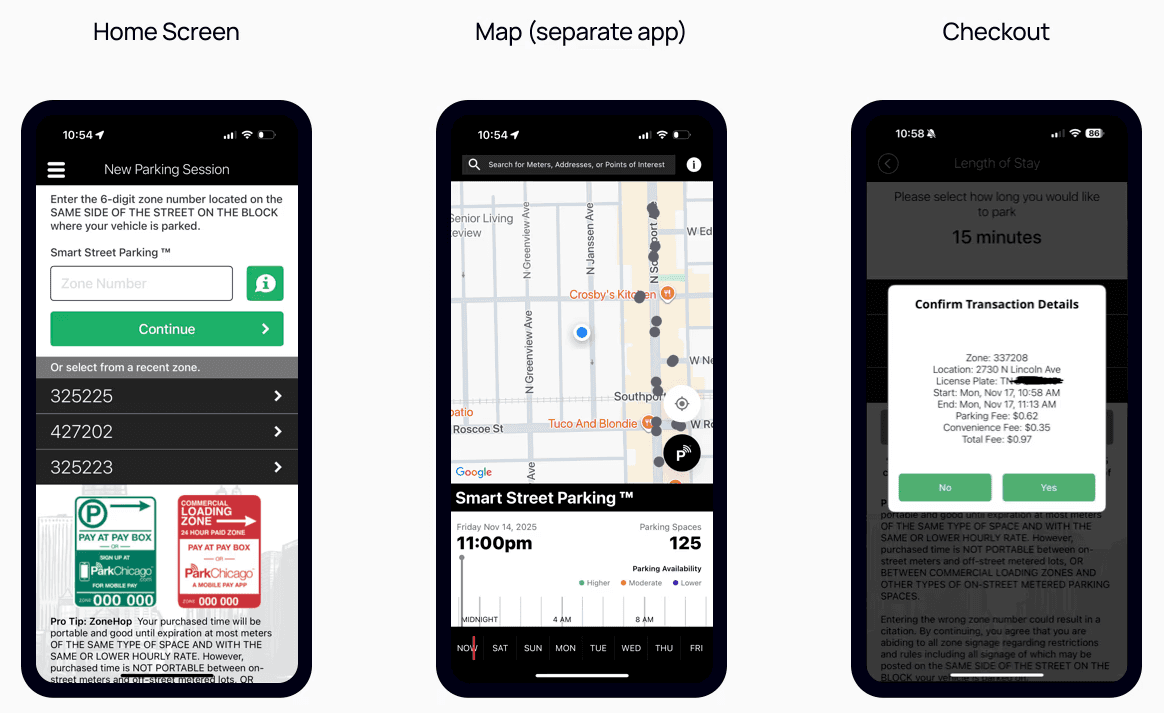
Current Platform (pre-redesign)
Conceptualization
Conceptualization
To address each insight we brainstormed solutions to use as the basis of our redesign:
Add flexible payment methods such as Apple/Google Pay, and a saved card that allows users to pay without reloading a balance.
Revamp the aesthetic of the Park Chicago interface by removing unnecessary text, prioritizing visual hierarchy, and building and implementing a consistent design system.
Add a parking map that shows estimated availability based on time and date and parking meter data. While Park Chicago has a parking map, it is a completely separate app.
Add a confirmation screen with a map that shows the zone the user selected, giving users the ability to double check they have selected the right zone adding a layer of error prevention and recovery and boosting user confidence.
Additionally, we established this requirement:
The changes made in the redesign should not be so drastic that it makes the app difficult or confusing for existing users
The app has thousands of users, many of whom use the app daily and are used to the existing interface and layout of the app.
We chose to map out the app structure and user journey and ensure that the redesigned app follows the same structure. Additionally, we retained the same function and mapping of the homepage.
Based on our chosen solutions, we made low fidelity sketches and wireframes to illustrate our ideas for the redesign. As a team, we reviewed these, conducted informal internal tests and noted what worked well and what UI elements we wanted in our design, structure and layout.
To address each insight we brainstormed solutions to use as the basis of our redesign:
Add flexible payment methods such as Apple/Google Pay, and a saved card that allows users to pay without reloading a balance.
Revamp the aesthetic of the Park Chicago interface by removing unnecessary text, prioritizing visual hierarchy, and building and implementing a consistent design system.
Add a parking map that shows estimated availability based on time and date and parking meter data. While Park Chicago has a parking map, it is a completely separate app.
Add a confirmation screen with a map that shows the zone the user selected, giving users the ability to double check they have selected the right zone adding a layer of error prevention and recovery and boosting user confidence.
Additionally, we established this requirement:
The changes made in the redesign should not be so drastic that it makes the app difficult or confusing for existing users
The app has thousands of users, many of whom use the app daily and are used to the existing interface and layout of the app.
We chose to map out the app structure and user journey and ensure that the redesigned app follows the same structure. Additionally, we retained the same function and mapping of the homepage.
Based on our chosen solutions, we made low fidelity sketches and wireframes to illustrate our ideas for the redesign. As a team, we reviewed these, conducted informal internal tests and noted what worked well and what UI elements we wanted in our design, structure and layout.
Prototype
Prototype
After deciding how we wanted our prototype to look, feel, and function, we got to work developing high fidelity screens for testing. These screens capture specific user needs we wanted to target.
After deciding how we wanted our prototype to look, feel, and function, we got to work developing high fidelity screens for testing. These screens capture specific user needs we wanted to target.
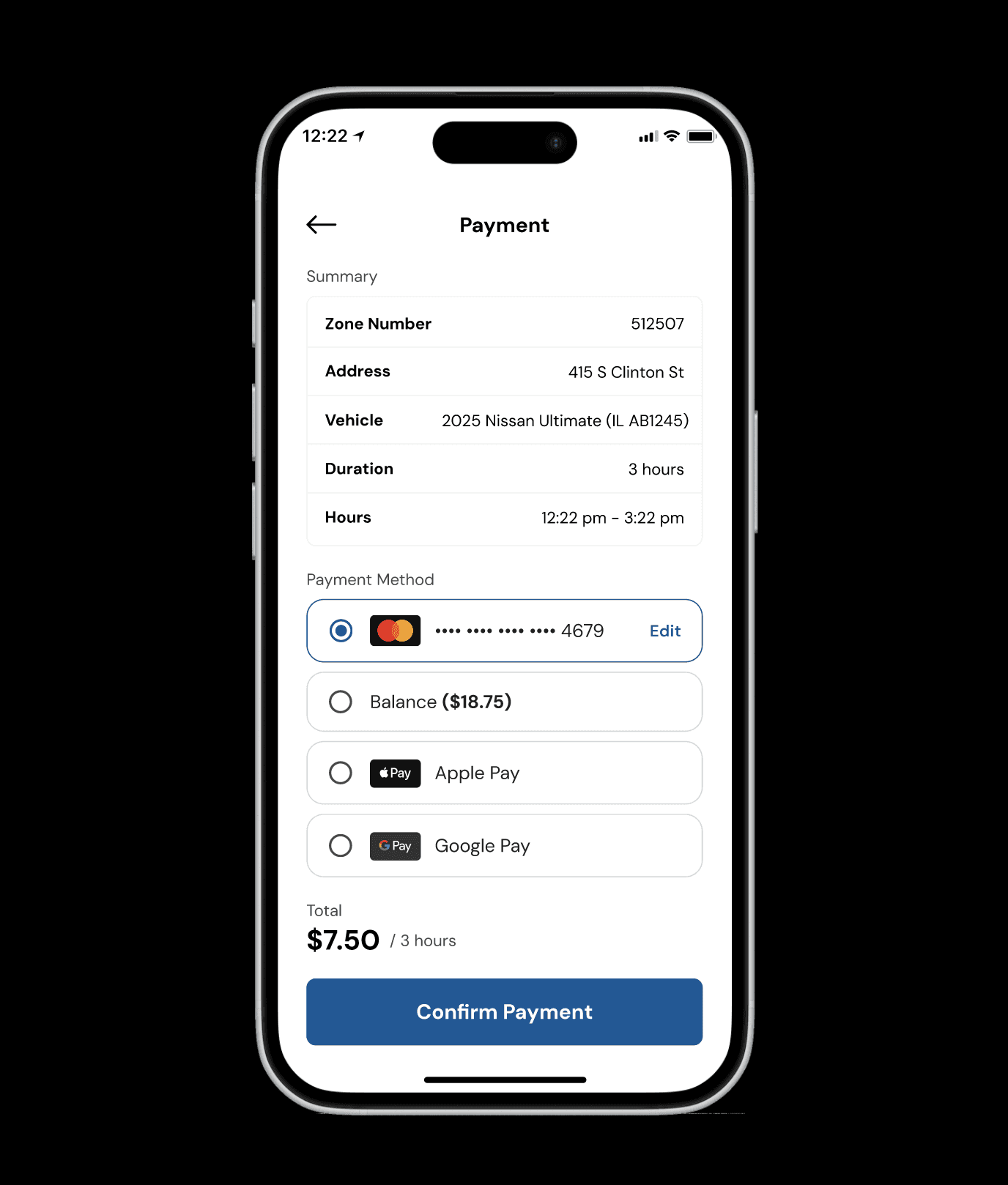
INSIGHT #1:
Users wanted more payment method options and disliked being forced to reload their account by $20 each time it ran out.
SOLUTION:
Add additional payment methods to the checkout process. If not possible, remove the initial $20 deposit necessary during the signup onboarding.
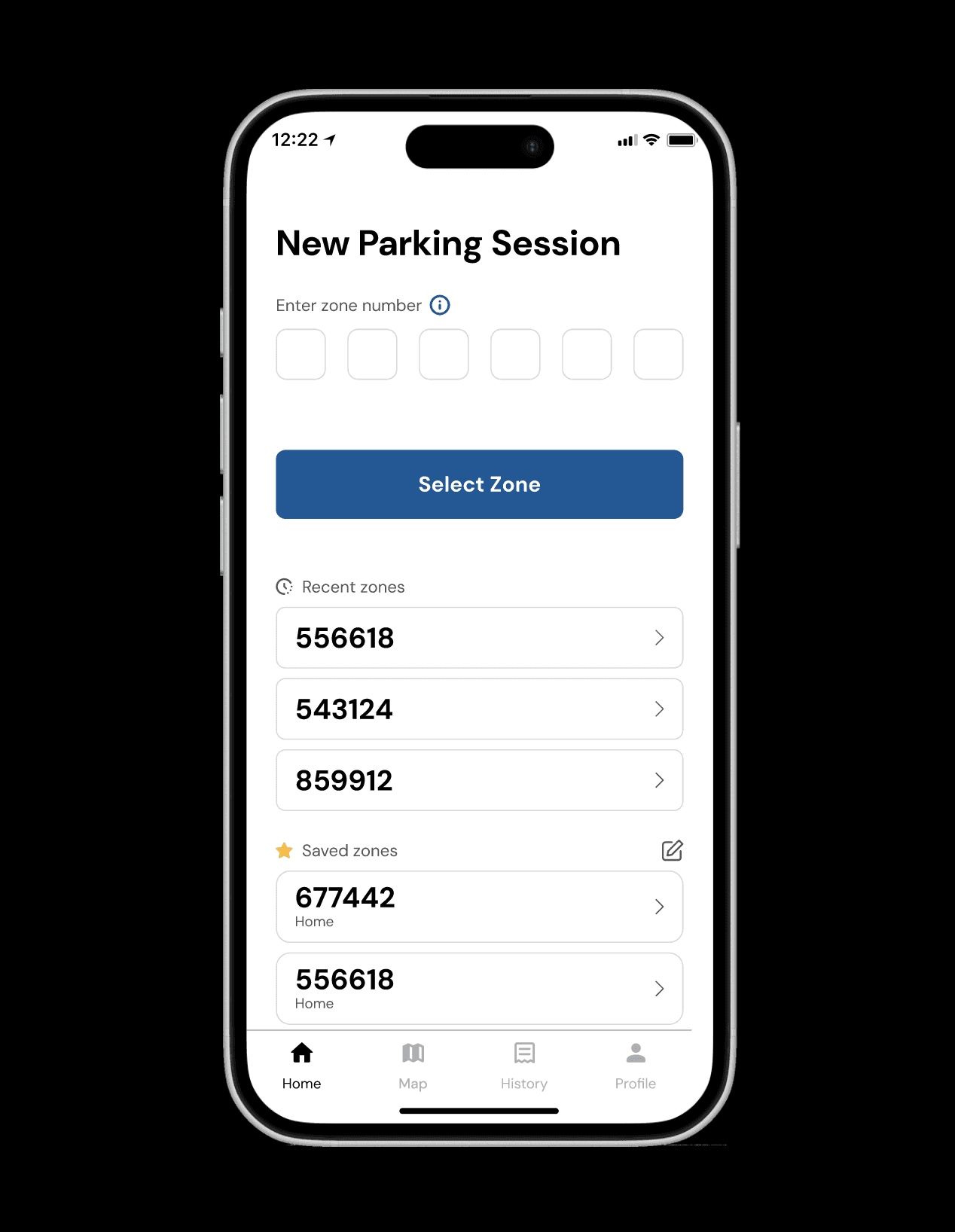
INSIGHT #2:
App interface is outdated and cluttered, lacks visual hierarchy.
SOLUTION:
Revamp the aesthetic of the Park Chicago interface by removing unnecessary text, prioritizing visual hierarchy, and building and implementing a consistent design system
INSIGHT #3:
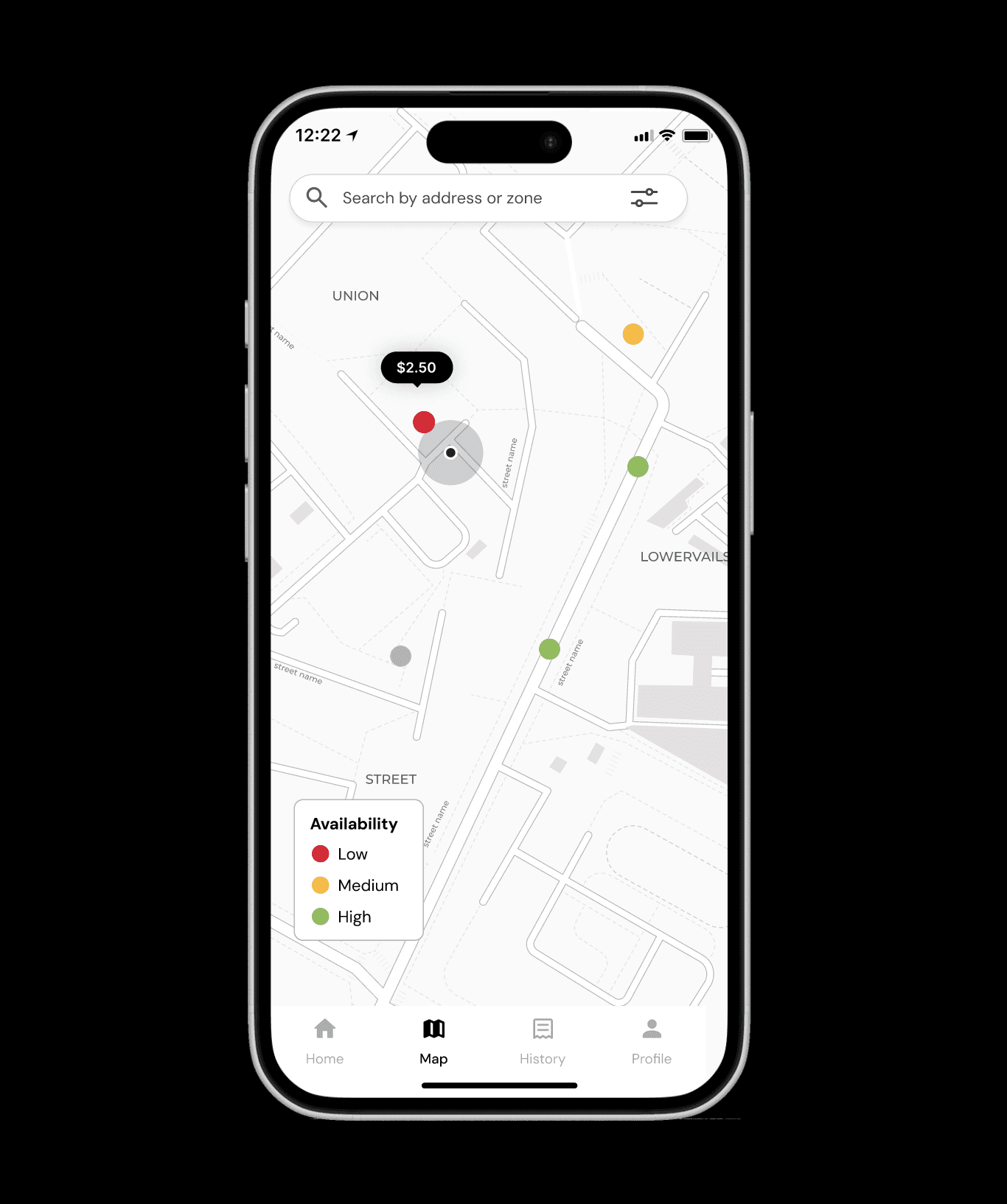
Users found it difficult to find available spaces, often circling the block to find one,
SOLUTION:
Add a parking map that shows estimated availability based on time and date and parking meter data.
INSIGHT #4:
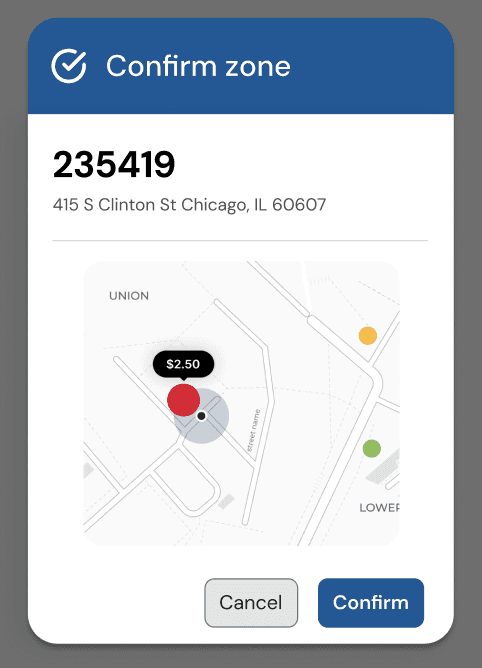
Users mentioned confusion and mixed confidence when first joining the app and using it to pay for parking, particularly with correct zone selection and parking rules.
SOLUTION:
Add a confirmation screen with a map that shows the zone the user selected, giving users the ability to double check they have selected the right zone adding a layer of error prevention and recovery and boosting user confidence.
Testing
Testing
We conducted two in-person tests on our prototype.
What we tested:
How Confident are Users with Zone Selection and Entry?
Task: Show users a parking sign and give them the task of manually entering the number on the sign.
Usability metrics: user confidence: how confident are users that they entered a zone number correctly? Does a double confirmation that shows zone proximity to a user’s current location increase user confidence, or add an unnecessary step to the parking process?
Is Direct Payment Actually Preferred Over Balance System?
Task: Direct users to complete a parking payment as they normally would for a single session. Then, have them imagine that they need to park in a second location later that day and have them repeat the payment process.
Usability metrics: ask which users prefer better: direct payment (new) or using a reloadable balance (old)
Is Map Integration Discoverable and Useful?
Task: Direct users to use the app as they normally would to find a parking zone. (Is the map feature discoverable?) Ask users what they think the colors on the map represent.
Usability metrics: discoverability (do users navigate to the map on their own?), mental models (do users’ mental models of the map’s features match how it actually works? Are their assumptions of the color associations accurate or is more explicit guidance necessary?)Add flexible payment methods such as Apple/Google Pay, and a saved card that allows users to pay without reloading a balance.
Testing Findings:
One user stated they felt more confident that their zone selection was correct with the confirmation popup window, while the other user felt it was unnecessary.
Recommendation: Remove the popup and instead add a map to the checkout process that shows user proximity to the selected zone.
Users felt the payment process was simple and straightforward. One user who frequently used the app noted that she likes reloading and paying with a balance because that is what she does daily, so removing it in our redesign was a pain point for her.
Recommendation: Continue offering multiple payment options, including saved cards for pay per session method and keep balance option for flexibility.
Users did not initially understand what the colors on the map signified
Recommendation: Enhance visual cues, add map marker clarity (map legend) to better communicate distances and zones.
We conducted two in-person tests on our prototype.
What we tested:
How Confident are Users with Zone Selection and Entry?
Task: Show users a parking sign and give them the task of manually entering the number on the sign.
Usability metrics: user confidence: how confident are users that they entered a zone number correctly? Does a double confirmation that shows zone proximity to a user’s current location increase user confidence, or add an unnecessary step to the parking process?
Is Direct Payment Actually Preferred Over Balance System?
Task: Direct users to complete a parking payment as they normally would for a single session. Then, have them imagine that they need to park in a second location later that day and have them repeat the payment process.
Usability metrics: ask which users prefer better: direct payment (new) or using a reloadable balance (old)
Is Map Integration Discoverable and Useful?
Task: Direct users to use the app as they normally would to find a parking zone. (Is the map feature discoverable?) Ask users what they think the colors on the map represent.
Usability metrics: discoverability (do users navigate to the map on their own?), mental models (do users’ mental models of the map’s features match how it actually works? Are their assumptions of the color associations accurate or is more explicit guidance necessary?)Add flexible payment methods such as Apple/Google Pay, and a saved card that allows users to pay without reloading a balance.
Testing Findings:
One user stated they felt more confident that their zone selection was correct with the confirmation popup window, while the other user felt it was unnecessary.
Recommendation: Remove the popup and instead add a map to the checkout process that shows user proximity to the selected zone.
Users felt the payment process was simple and straightforward. One user who frequently used the app noted that she likes reloading and paying with a balance because that is what she does daily, so removing it in our redesign was a pain point for her.
Recommendation: Continue offering multiple payment options, including saved cards for pay per session method and keep balance option for flexibility.
Users did not initially understand what the colors on the map signified
Recommendation: Enhance visual cues, add map marker clarity (map legend) to better communicate distances and zones.
Delivery
Delivery
Final Interactive Prototype
Reflection
Reflection
Context is important: in what situations are users interacting with an app? What emotional states or other factors need to be kept in mind when designing? Ideally we would have conducted our contextual interviews while users are actively paying for parking so we can best understand their emotions and routine.
Disruptive design changes can erode user trust: while the changes we made to the app felt necessary and a stark improvement to us, testing our prototype with an everyday user showed us that changes can be disruptive to a user routines
What I learned:
Context is important: in what situations are users interacting with an app? What emotional states or other factors need to be kept in mind when designing? Ideally we would have conducted our contextual interviews while users are actively paying for parking so we can best understand their emotions and routine.
Disruptive design changes can erode user trust: while the changes we made to the app felt necessary and a stark improvement to us, testing our prototype with an everyday user showed us that changes can be disruptive to a user routines
What I learned:
Context is important: in what situations are users interacting with an app? What emotional states or other factors need to be kept in mind when designing? Ideally we would have conducted our contextual interviews while users are actively paying for parking so we can best understand their emotions and routine.
Disruptive design changes can erode user trust: while the changes we made to the app felt necessary and a stark improvement to us, testing our prototype with an everyday user showed us that changes can be disruptive to a user routines